GitOps with ArgoCD
Overview
Container Platform 3 (CP3) deploys application and platform workloads with Argo CD using a GitOps model. Git is the single source of truth: the desired state of every workload lives in a Git repository, and Argo CD continuously reconciles each target cluster so that what is running matches what is committed.
CP3 runs Argo CD as an EKS-managed capability. The Argo CD control plane runs in AWS-managed infrastructure attached to the cluster, not as pods on the cluster’s own worker nodes. Authentication for engineers is handled through AWS IAM Identity Center (SSO), and access to Git repositories goes through AWS CodeConnections.
The platform uses a hub and spoke topology. A small number of hub clusters run Argo CD and deploy to a larger number of spoke clusters that host the actual workloads. There are two independent instances:
- a nonlive hub that manages all nonlive spokes, and
- a live hub that manages all live spokes.
Keeping the two instances separate means a change to Argo CD (an upgrade, a new capability version, or a configuration change) can be proven against nonlive workloads before it reaches live workloads.
This page is a developer and platform-engineer guide to how the solution works and how to operate it. The Terraform that implements it lives in modernisation-platform-environments under
terraform/environments/cloud-platform, and the design is recorded in ADR-002 GitOps Fleet Management and ADR-018 Deployment Model Flexibility.
Architecture

The diagram shows the full picture: the GitOps source repository, the two hub clusters in the hub account, the business-unit spoke clusters split by tier, and the ephemeral hub/spoke pairs used for development.
Hubs
A hub is an EKS cluster that runs the Argo CD capability. Two permanent hubs live in the hub account:
| Hub cluster | Tier | Manages |
|---|---|---|
cloud-platform-nonlive |
nonlive | all nonlive spokes |
cloud-platform-live |
live | all live spokes |
Each hub gets a dedicated IAM role named <cluster-name>-argocd-capability
(for example cloud-platform-nonlive-argocd-capability). This is the identity
the EKS-managed Argo CD runs as. It is the role that reads Git through
CodeConnections and the role that authenticates to spoke clusters.
A cluster becomes a hub when its Terraform workspace is listed in
local.argocd_hubs, or when it is deployed with enable_argocd = true (used
for ephemeral development hubs). Hub clusters are tagged argocd-role=hub.
Spokes
A spoke is an EKS cluster that receives workloads from a hub. Spokes do not run an Argo CD control plane of their own. Each business unit (OCTO, LAA, HMPPS, etc) has spoke clusters in its own AWS account, one per tier (nonlive and live).
A spoke grants the hub access by creating a single EKS access entry for the
hub’s capability role and placing that role in the Kubernetes group
argocd-hub. Scoped RBAC bound to that group is what authorises the hub (see
Security model).
How the hub reaches a spoke
Cross-account access is native to EKS access entries, so no VPC peering or Transit Gateway is needed for GitOps traffic. The flow is:
- The EKS-managed Argo CD on the hub authenticates to the spoke’s Kubernetes API as the hub’s capability role.
- The spoke’s access entry maps that role into the
argocd-hubgroup. - Kubernetes RBAC bound to
argocd-hubdecides what the hub may read and write.
On the hub, each spoke is registered with a minimal Kubernetes Secret labelled
argocd.argoproj.io/secret-type: cluster. That Secret contains only the spoke’s
name and its cluster ARN (the server field). It deliberately carries no
roleARN, no awsAuthConfig, and no bearer token, because the authentication
is handled entirely by the IAM role and the spoke’s EKS access entry.
Tier isolation
A hub only ever registers spokes in its own tier. The nonlive hub derives its tier from its workspace and builds its spoke list from nonlive spokes only; the live hub does the same for live. A nonlive hub cannot register or deploy to a live spoke, and the reverse is also true. This boundary is enforced in Terraform, not by convention alone.
How workloads reach a spoke
User workloads are defined as Helm values and manifests in the container-platform-environments monorepo, under a predictable path:
namespaces/<business-unit>/<product>/<service>/deployment/values/<tier>/<name>.yaml
On each hub, per-business-unit ApplicationSets watch that repository with Git generators. When a values file appears, the ApplicationSet renders an Argo CD Application from a template and points its destination at the correct spoke cluster and namespace. Argo CD then syncs the workload (Deployment, Service, ConfigMap, HTTPRoute, and so on) onto the spoke.
A per-business-unit AppProject (for example octo-nonlive) scopes what
those Applications are allowed to do: which source repositories they can pull
from and which destination clusters and namespaces they can deploy to.
A separate baseline ApplicationSet renders the app-baseline chart for each
product. The baseline creates the namespace, a default-deny NetworkPolicy,
and the per-namespace RoleBindings that grant teams access to their own
namespaces. The baseline runs so that a namespace and its guardrails exist
before workloads land in it.
Repository structure: what good looks like
The diagram below shows how one product maps from the repository, through the two ApplicationSets, to the resources that end up on a spoke. Every business unit and product follows the same layout, so this is the shape to copy when onboarding a new workload.

A product is described by a single product.yaml plus one directory per
service:
product.yamldeclares the product’s environments and access. Each environment maps a logical stage (dev,staging,prod) to a target cluster and namespace, and theaccessblock lists which GitHub team groups getview,edit, oradminin those namespaces. Live environments should default toviewonly, because deployments go through Argo CD rather than direct cluster access.- Each service (for example
helloworld-api) has adeployment/directory containing its Helm chart (Chart.yaml,templates/) and avalues/tree split by tier:values/nonlive/(for exampledev.yaml,staging.yaml) andvalues/live/(for exampleprod.yaml).
The two ApplicationSets read different parts of this layout:
- The baseline ApplicationSet reads each
product.yamland renders the sharedapp-baselinechart, creating the Namespace,RoleBindings, and the default-denyNetworkPolicyfor every environment on the target cluster. - The workload ApplicationSet reads each values file under
deployment/values/<tier>/and renders that service’s own chart with the selected values, deploying the Deployment, Service, HTTPRoute, and related objects into the mapped namespace.
Because the tier lives in the path, the same service definition produces isolated dev and staging namespaces on the nonlive spoke, while the production values deploy to the live spoke through the separate live hub.
Key features
- EKS-managed control plane. Argo CD runs as an EKS capability in AWS-managed infrastructure. There are no Argo CD pods to run, patch, or scale on worker nodes, and there is one Argo CD capability per cluster (an EKS limit).
- Two independent instances. Nonlive and live are fully separate hubs, so platform changes are validated on nonlive before reaching live.
- Multi-account by design. Hubs and spokes live in different AWS accounts. The hub reaches each spoke through EKS access entries, with no cross-account assume-role and no network peering for GitOps traffic.
- Declarative fleet management. ApplicationSets generate Applications from the Git monorepo, so onboarding a new workload is a Git change rather than a manual Argo CD operation.
- SSO authentication. Engineers authenticate to the Argo CD UI and API through IAM Identity Center; access is mapped to SSO groups.
- Ephemeral test environments. Development hub/spoke pairs can be created and destroyed on demand, wired together by a naming convention.
Security model
The security posture centres on least privilege for the hub on each spoke.
The hub’s capability role is registered on a spoke with an EKS access entry, but
no EKS access policy is attached. AmazonEKSClusterAdminPolicy is
equivalent to system:masters, which AWS documents as unsuitable for
production. Instead, authorisation comes from two custom ClusterRoles bound to
the argocd-hub group:
| ClusterRole | Scope | Purpose |
|---|---|---|
argocd-hub-read-all |
get, list, watch on all resources |
Resource discovery, health assessment, and drift detection |
argocd-hub-deploy |
write on a fixed set of workload kinds | Creating and updating the resources Applications actually manage |
argocd-hub-deploy grants write access to namespaces, core workload resources
(ConfigMaps, Secrets, Services, ServiceAccounts, PVCs), workload controllers
(Deployments, StatefulSets, DaemonSets, ReplicaSets, Jobs, CronJobs, HPAs, PDBs),
Ingresses and NetworkPolicies, Gateway API routes (HTTPRoute, GRPCRoute,
ListenerSet), and namespace-scoped RBAC (Roles and RoleBindings). It can bind
only the built-in view, edit, and admin ClusterRoles.
The hub is deliberately not granted the ability to write cluster-scoped RBAC (ClusterRoles or ClusterRoleBindings), install CustomResourceDefinitions, change admission webhooks, or touch nodes. A compromised hub therefore cannot escalate its own privileges on a spoke, install cluster-wide controllers, or tamper with admission control. This least-privilege boundary is guarded by regression tests in container-platform-integration-tests.
Two more properties reinforce the model:
- Minimal registration Secret. The cluster Secret on the hub holds only the spoke name and cluster ARN. No credentials are stored in it, so there is nothing sensitive to leak from the registration data itself.
- Tier isolation. Because a hub only registers spokes in its own tier, a nonlive hub has no access path to a live spoke.
Operational benefits
- Smaller blast radius. Splitting nonlive and live limits the impact of an Argo CD change or outage to a single tier.
- Less to operate. The managed control plane removes the work of running Argo CD itself, so the team focuses on Applications and policy rather than on Argo CD availability.
- Auditable changes. Every workload change is a Git commit, giving a review trail and a straightforward rollback (revert the commit).
- Consistent onboarding. New workloads and new business units follow the same repository layout and the same ApplicationSet machinery.
- Fast, safe experimentation. Ephemeral hub/spoke pairs let engineers test changes end to end on real infrastructure and then tear it all down.
Runbooks
These runbooks are for platform engineers operating the Argo CD solution. They
assume you have an active AWS SSO session for the relevant account and, where
noted, kubectl access to the target cluster.
Set your profile and region before running aws or kubectl:
export AWS_PROFILE=<profile> AWS_REGION=eu-west-2
aws eks update-kubeconfig --name <cluster-name>
You do not need local AWS credentials to run the GitHub Actions workflows; CI
authenticates to AWS with its own OIDC role. You only need local credentials for
your own aws and kubectl verification.
Running the workflows with the GitHub CLI
The runbooks below trigger GitHub Actions workflows from the command line using
gh, the official GitHub CLI. It lets you run
workflows, open issues, and manage pull requests from a terminal instead of the
browser. Install it with brew install gh (macOS) or follow the
installation guide, then sign in once
with gh auth login.
The command used throughout is gh workflow run, which dispatches a workflow.
Each -f key=value flag sets one of the workflow’s inputs.
Prefer a browser? Every
gh workflow runexample here has an equivalent in the GitHub Actions UI: open the workflow, choose Run workflow, and fill in the same inputs. See Create Development Cluster for the UI walkthrough.
Spin up an ephemeral hub and spoke pair
Ephemeral clusters are created with the Development Cluster Deployment workflow in cloud-platform-github-workflows. All ephemeral clusters land in the development account.
Pair a hub and spoke with a shared prefix and the suffixes -hub and -spoke,
for example cp-1708-2235-hub and cp-1708-2235-spoke.
- Deploy the hub with Argo CD enabled:
   gh workflow run "Development Cluster Deployment" \
     --repo ministryofjustice/cloud-platform-github-workflows \
     --ref main \
     -f cluster_action=deploy \
     -f cluster_name=cp-1708-2235-hub \
     -f branch_name=main \
     -f enable_argocd=true
Read the hub’s capability role ARN. It follows the convention
arn:aws:iam::<dev-account-id>:role/<hub-name>-argocd-capability, and the deploy job also prints it in the workflow summary.Deploy the spoke. An ephemeral spoke whose name ends in
-spokeself-registers with its-hubpartner in the same account. Passing it explicitly is a safe override:
   gh workflow run "Development Cluster Deployment" \
     --repo ministryofjustice/cloud-platform-github-workflows \
     --ref main \
     -f cluster_action=deploy \
     -f cluster_name=cp-1708-2235-spoke \
     -f branch_name=main \
     -f argocd_hub_capability_role_arn=arn:aws:iam::<dev-account-id>:role/cp-1708-2235-hub-argocd-capability
The hub side auto-creates the spoke’s cluster registration Secret from the same naming convention, so no manual Secret is needed.
branch_nameselects which version of the Terraform code deploys and is truncated to 12 characters. Usemainonce your changes are merged. See Create Development Cluster for the UI-based equivalent.
Tear down an ephemeral hub and spoke pair
Destroy the spoke first, then the hub. This removes the spoke’s access entry before the hub that references it goes away.
# 1. Destroy the spoke
gh workflow run "Development Cluster Deployment" \
  --repo ministryofjustice/cloud-platform-github-workflows \
  --ref main \
  -f cluster_action=destroy \
  -f cluster_name=cp-1708-2235-spoke \
  -f branch_name=main

# 2. Destroy the hub
gh workflow run "Development Cluster Deployment" \
  --repo ministryofjustice/cloud-platform-github-workflows \
  --ref main \
  -f cluster_action=destroy \
  -f cluster_name=cp-1708-2235-hub \
  -f branch_name=main
On a development hub, a pre-destroy cleanup step runs automatically before the
cluster is removed. It deletes all Argo CD Applications and ApplicationSets to
stop sync loops, deletes the Argo CD capability through the AWS API, removes
finalizers from the argocd namespace, and then deletes that namespace. This
cleanup prevents the cluster deletion from hanging on stuck resources.
Destroying a cluster while the Argo CD capability is still attached fails with
ResourceInUseException: Cluster has capabilities attached. Always destroy through the workflow, which orders these steps correctly, rather than deleting the cluster directly.
Onboard a permanent spoke
Permanent spokes do not self-register. Adding one is a deliberate, reviewed change in modernisation-platform-environments:
- Add the spoke’s workspace name to
argocd_registered_spokesin the correct tier block ofcluster/environment-configuration.tf. The nonlive block for the nonlive hub, the live block for the live hub. - Raise a PR. The registration only takes effect when the spoke is a known permanent environment and appears in the tier’s allowlist.
- On apply, the spoke creates the
argocd-hubaccess entry and RBAC, and the hub creates the matching cluster registration Secret and AppProjects.
Removing a spoke is the reverse: delete it from argocd_registered_spokes and
apply.
Manage the hub-to-spoke RBAC
The access the hub has on a spoke is defined by the argocd-hub-read-all and
argocd-hub-deploy ClusterRoles in cluster/argocd.tf. To inspect what is
actually applied on a spoke:
aws eks update-kubeconfig --name <spoke-name>

# The access entry that maps the hub role into the argocd-hub group
aws eks list-access-entries --cluster-name <spoke-name>
aws eks describe-access-entry \
  --cluster-name <spoke-name> \
  --principal-arn <hub-capability-role-arn>

# The RBAC bound to the argocd-hub group
kubectl get clusterrole argocd-hub-read-all argocd-hub-deploy
kubectl describe clusterrole argocd-hub-deploy
kubectl get clusterrolebinding | grep argocd-hub
To change what the hub may do (for example to allow a new resource kind that a
workload needs), edit the argocd-hub-deploy ClusterRole in cluster/argocd.tf
and apply through the normal PR pipeline. Keep the change least-privilege: add
only the specific api group, resource, and verbs required. Adding cluster-scoped
RBAC, CRD, webhook, or node permissions is out of scope for the hub by design,
and the integration tests will fail if those guardrails are weakened.
Manage namespaces on a spoke
Namespaces on a spoke are created by GitOps, not by hand. A namespace comes into
existence when the app-baseline chart runs for a product, which also applies
the default-deny NetworkPolicy and the per-namespace RoleBindings.
- To add a namespace, add or update the product definition in the container-platform-environments monorepo so the baseline ApplicationSet renders it.
- To confirm what is deployed, inspect the spoke:
  aws eks update-kubeconfig --name <spoke-name>
  kubectl get namespaces
  kubectl get networkpolicy -A | grep default-deny
  kubectl get rolebindings -n <namespace>
Avoid creating namespaces with kubectl on a spoke. A manually created
namespace is not tracked in Git and will drift from the desired state.
Inspect Argo CD on a hub
aws eks update-kubeconfig --name <hub-name>

# Registered spokes (one Secret per spoke)
kubectl -n argocd get secrets -l argocd.argoproj.io/secret-type=cluster

# Applications and their sync/health status
kubectl -n argocd get applications
kubectl -n argocd get applicationsets
kubectl -n argocd describe application <name>
Engineers can also reach the Argo CD UI for a hub by signing in through IAM Identity Center (IDC). The level of access depends on the SSO group the signed-in user is mapped to:
- Cloud Platform engineers sign in with a user mapped to the Argo CD admin SSO group, giving full control of Applications and settings.
- Application (tenant) engineers sign in with a user mapped to the Argo CD read-only SSO group, so they can view and inspect their Applications and sync status without being able to change them. Their workloads are changed through Git, not directly in the UI.
Sync a workload
How a workload reaches its spoke after a merge depends on the tier, and this is
deliberate (ADR-002 GitOps Fleet Management).
The sync policy is set per tier in cluster-core/argocd-gitops.tf, driven by
auto_sync = env == "nonlive" in cluster-core/locals.tf:
- nonlive uses
automatedwithpruneandselfHeal, so Argo CD applies merged changes on its own and reverts manual drift. - live sets
automated: null, so the Application goesOutOfSyncafter a merge and waits for an engineer to sync it.
The app-baseline workloads (Namespace, default-deny NetworkPolicy,
RoleBindings) always auto-sync on both tiers, so a namespace and its guardrails
are never left un-applied.
Why live is manual. A live change is a two-person, two-step action: the Git review and merge is the first gate, and the sync is a second, explicit human action on the live hub. Nothing reaches a live spoke without someone choosing to release it, and self-heal is off so a deliberate manual intervention is not fought by Argo CD.
Sync from the UI (the standard path). Sign in to the live hub’s Argo CD as described in Inspect Argo CD on a hub. From the Applications dashboard choose Sync Apps. The dialog lists every Application on the hub, so tick only the ones you intend to release, then choose Sync. Releasing a live workload is a Cloud Platform engineer action.
Sync options. The defaults are correct for both a new Application and an existing one, so in normal use you do not need to change any of them. Three are worth understanding:
- Auto-create namespace must stay off. Both ApplicationSets set
CreateNamespace=false, and the namespace is a resource of the auto-syncingapp-baselineApplication. Letting Argo CD create it here would produce a namespace without the default-denyNetworkPolicyandRoleBindings. - Apply out of sync only limits the operation to resources that have drifted. That is useful on an existing Application and has no effect on a new one, where every resource is missing and therefore out of sync already.
- Prune deletes resources that are no longer in Git. Live has no automated prune, so this dialog is the only place those deletions happen. Leave it off unless you have confirmed what it would remove.
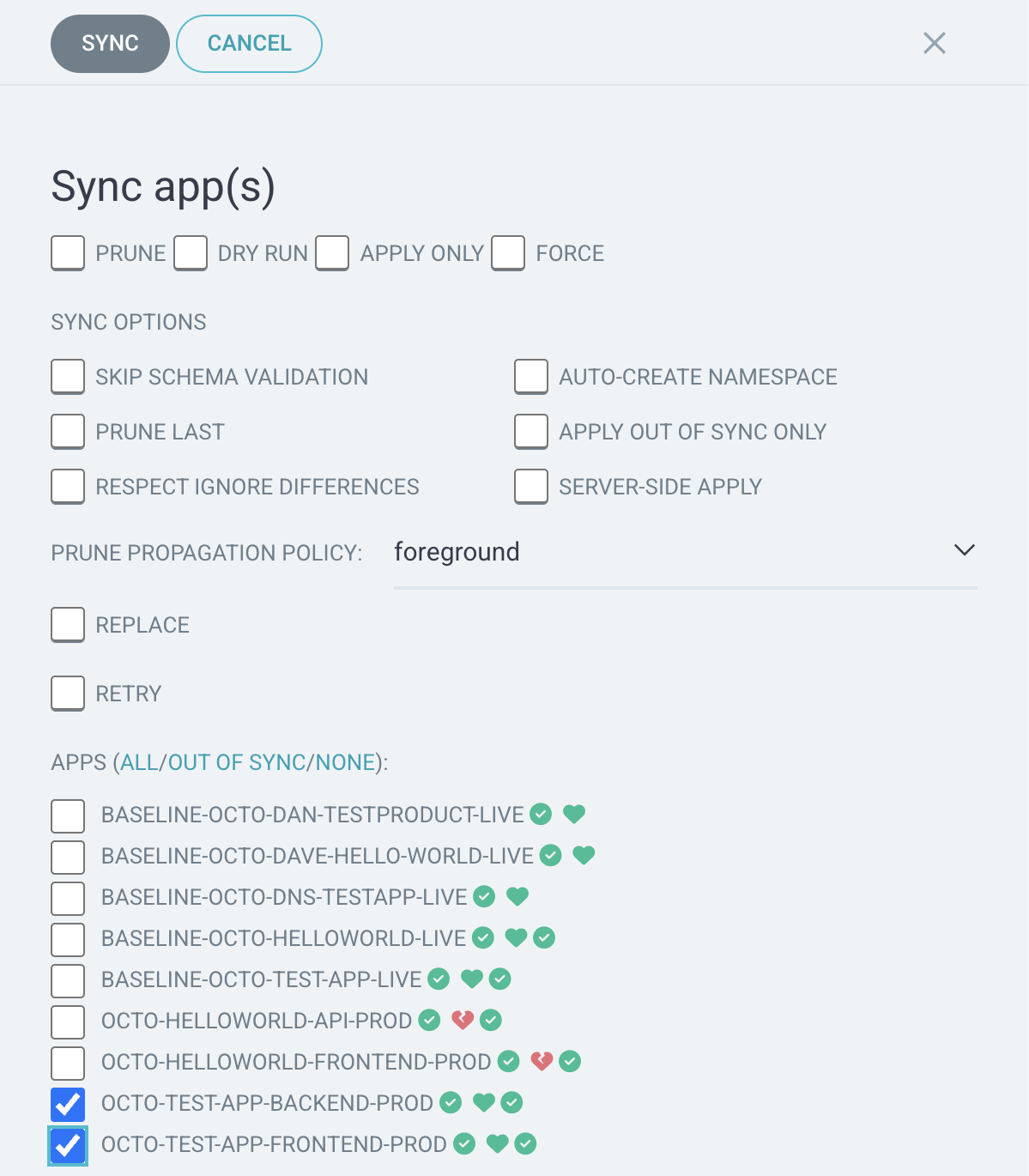
Sync from the command line. With kubectl access to the live hub you can
trigger the same sync by setting the Application’s operation field:
aws eks update-kubeconfig --name cloud-platform-live

# Check what is waiting to be released
kubectl -n argocd get applications

# Sync one Application, as the UI does
kubectl -n argocd patch application <application-name> --type merge \
  -p '{"operation":{"initiatedBy":{"username":"<your-username>"},"sync":{"syncStrategy":{"hook":{}}}}}'

# Watch it converge to Synced / Healthy
kubectl -n argocd get application <application-name> -w
Both paths sync the Application’s target revision, which is the head of main
as Argo CD last saw it, so a sync releases everything merged since the previous
one rather than only your own commit. The revision that actually went out is
recorded in status.sync.revision. For pruning, resource selection and the
other operation fields, see the Argo CD guide to
syncing applications with kubectl.
A typical live release therefore is: merge the values change (for example a new
image digest) to main, confirm the Application shows OutOfSync on the live
hub, then sync it and confirm it returns to Synced and Healthy. On nonlive
the same merge is picked up automatically and no sync step is needed.
Troubleshooting
Spoke reconcile fails with “failed to verify the access entry”
Symptom. Every Application targeting a spoke fails, and the hub logs show
failed to verify the access entry for that cluster.
Cause. The EKS-managed Argo CD authenticates to a spoke as the hub’s capability role. If the spoke’s access entry was created for a different principal (for example a separate spoke-access role), the capability role is not recognised and every API call is rejected.
Fix. Confirm the spoke has an access entry for the hub’s capability role ARN
and that it maps to the argocd-hub group:
aws eks list-access-entries --cluster-name <spoke-name>
aws eks describe-access-entry --cluster-name <spoke-name> \
  --principal-arn <hub-capability-role-arn>
If the entry is missing or points at the wrong principal, re-apply the spoke’s
Terraform (or correct argocd_hub_capability_role_arn) so the capability role
is registered.
An Application is stuck with a “forbidden” sync error
Symptom. An Application reports a sync error such as
... is forbidden: User "..." cannot create resource "...".
Cause. The resource kind is outside the argocd-hub-deploy ClusterRole. The
hub can only write the workload kinds listed in Security model;
it cannot write cluster-scoped RBAC, CRDs, webhooks, or nodes.
Fix. If the workload legitimately needs a kind that is in scope but not yet
granted, add that specific api group, resource, and verbs to argocd-hub-deploy
in cluster/argocd.tf and apply. If it needs a cluster-scoped or CRD-level
resource, that is intentionally not permitted for the hub; raise it with the
platform team rather than widening the role.
Cluster destroy fails with “Cluster has capabilities attached”
Symptom. Destroying a hub fails with
ResourceInUseException: Cluster has capabilities attached.
Cause. The Argo CD capability must be removed before the cluster can be deleted.
Fix. Destroy through the Development Cluster Deployment workflow, which runs the pre-destroy cleanup in the correct order. Avoid deleting the cluster directly.
Capability creation fails with “trust policy is invalid”
Symptom. A fresh hub deploy fails while creating the Argo CD capability, citing an invalid trust policy.
Cause. IAM role propagation is eventually consistent. The capability role was just created and is not yet visible to the capability service. A short propagation delay is built into the module, but a slow apply can still hit this.
Fix. Re-run the apply. The role will have propagated by the second attempt.
An ephemeral spoke did not register with its hub
Symptom. A dev spoke deploys, but the hub never creates a registration Secret or Applications for it.
Cause. Ephemeral self-registration relies on the naming convention. The hub
and spoke must share the same prefix and use the -hub and -spoke suffixes,
both must be in the development account, and the spoke must be a
development_cluster.
Fix. Check the names match the convention (cp-1708-2235-hub pairs with
cp-1708-2235-spoke). If you used non-matching names, pass the hub ARN
explicitly with argocd_hub_capability_role_arn when deploying the spoke.
The repo server cannot clone from Git
Symptom. Applications fail to sync with a repository or authentication error against the Git source.
Cause. The EKS-managed Argo CD reads Git through AWS CodeConnections using the hub’s capability role. If the CodeConnections permissions are missing from that role, the repo server cannot authenticate.
Fix. Confirm the codeconnection-access policy is attached to the hub’s
capability role and that the github-ministryofjustice CodeConnection is available.
Re-apply the hub Terraform if the policy is missing.
kubectl reports “you must be logged in to the server”
Symptom. kubectl commands against a cluster fail mid-session with an
authentication error.
Cause. The token minted by aws eks update-kubeconfig has expired, or your
AWS SSO session has expired.
Fix. Refresh your AWS session, then re-run
aws eks update-kubeconfig --name <cluster-name>.
Integration tests collide with manual Argo CD objects
Symptom. The integration test suite fails on a cluster where you have been testing by hand.
Cause. Manually applied Argo CD objects (AppProjects, cluster Secrets) clash with the objects the tests create.
Fix. Remove any manually created Argo CD test objects from the cluster before running the suite.
Reference
| Item | Location |
|---|---|
| Hub and spoke Terraform |
modernisation-platform-environments terraform/environments/cloud-platform/cluster/argocd.tf
|
| Hub GitOps config (AppProjects, ApplicationSets) | terraform/environments/cloud-platform/cluster-core/argocd-gitops.tf |
| Argo CD capability module | terraform/environments/cloud-platform/cluster/modules/argo-cd/ |
| Workload manifests | container-platform-environments |
| RBAC regression tests | container-platform-integration-tests |
| Deployment workflow | Development Cluster Deployment |
| Design decisions | ADR-002 GitOps Fleet Management, ADR-018 Deployment Model Flexibility |